ArborDash has a small, read-only REST API for getting your own data out, into Google Sheets, a BI tool, Zapier, or anything else that can make an HTTP request.
Read-only, on purpose. Every endpoint below is a GET. There is no public write API: nothing here creates a customer or an invoice. If you need to push data in, email [email protected] and tell us what you are building. That shapes what we open up next.
Getting a key
Create one in the dashboard under Integrations, in the API Access section. Click Generate key, give it a label, and tick only the scopes that thing actually needs.
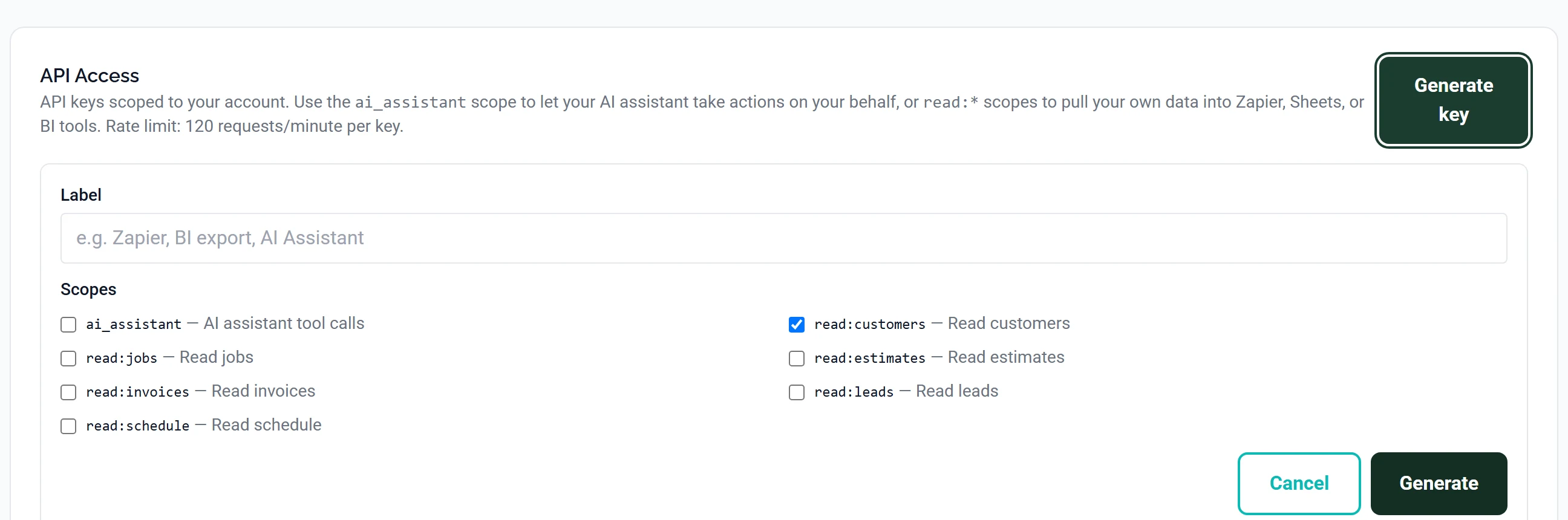
Your key looks like adk_live_... and is shown once, when it is created. We store a hash of it, not the key, so we genuinely cannot tell you what it was later. Put it straight into your password manager.
A key is a doorway into your data with no second factor in front of it. Never put one in a browser page, a public repository, or a spreadsheet you share. Use a separate key per integration so you can revoke one without breaking the others.
Making a request
Send the key as a bearer token:
curl https://api.arbordash.app/api/v1/customers \
  -H "Authorization: Bearer adk_live_your_key_here"
Responses are JSON, with the rows under data:
{
  "data": [
    {
      "id": 412,
      "name": "Linda Martinez",
      "email": "[email protected]",
      "phone": "555-0142",
      "address": "118 Ridgeway Ave",
      "created_at": "2026-03-04T15:22:10.000Z",
      "updated_at": "2026-09-19T09:02:55.000Z",
      "last_job_at": "2026-09-18T00:00:00.000Z"
    }
  ],
  "limit": 100
}
Endpoints
All are under https://api.arbordash.app/api/v1. Each needs its own scope on the key.
| Endpoint | Scope required | Returns |
|---|---|---|
GET /customers | read:customers | Your customers, with contact details and when they last had work done |
GET /jobs | read:jobs | Jobs and their status |
GET /estimates | read:estimates | Estimates and their status |
GET /invoices | read:invoices | Invoices, totals and payment status |
GET /leads | read:leads | Incoming leads |
GET /schedule | read:schedule | What is booked in, by date |
GET /me | any valid key | Which account the key belongs to, and its scopes |
GET /me is the one to call first. It confirms the key works and shows exactly what it can reach, which saves guessing when something returns 401.
Paging and incremental pulls
Two query parameters, supported everywhere:
| Parameter | Default | What it does |
|---|---|---|
limit | 100 (max 500) | How many rows to return |
updated_since | — | Only rows changed on or after this time, as ISO 8601 |
curl "https://api.arbordash.app/api/v1/invoices?limit=500&updated_since=2026-09-01T00:00:00Z" \
  -H "Authorization: Bearer adk_live_your_key_here"
Use updated_since for anything that runs on a schedule. Store the time of your last successful run and pass it next time: you pull only what changed, which is faster for you and lighter on the rate limit.
Errors
| Status | Means | Do |
|---|---|---|
401 | Key missing, wrong, revoked, or lacking the scope for this endpoint | Check it with GET /me |
429 | Rate limited | Back off and retry; pull less often with updated_since |
500 | Something broke on our side | Retry; if it persists, email support with the time it happened |
What is deliberately not here
The dashboard itself talks to a much larger internal API. It is not documented, it is not versioned, and it is authenticated by your browser session rather than by a key.
Please do not build against it. It changes without notice, and that freedom is what lets us keep improving the product quickly. The endpoints on this page are the ones we have committed to keeping stable.
Common questions
Can I use this to feed Google Sheets?
Yes, that is the main thing people use it for. Any tool that can call a URL with a header will work.
Are there webhooks?
Not for tenant integrations yet. Poll with updated_since for now. If webhooks would make a real difference to something you are building, tell us. Demand is how we decide.
Can a key reach another company's data?
No. Every key belongs to one account and every query is restricted to it, server-side. There is no parameter that widens that.
What happens if a key leaks?
Revoke it in Integrations and it stops working immediately. Create a replacement and update whatever was using it. Requests made with a key are logged, so we can tell you what it was used for.
Is there a sandbox?
No. The API is read-only, so there is nothing a test call can damage. Point it at your real account.