ArborDash can take money off an estimate two ways: off the whole thing, or off individual lines. Both can be a percentage or a flat dollar amount. The discount is shown to the customer on the estimate, so they can see what they saved.
Turn discounting on
- Open the estimate and scroll to Apply Discount.
- Tick the box. The discount controls appear underneath it.
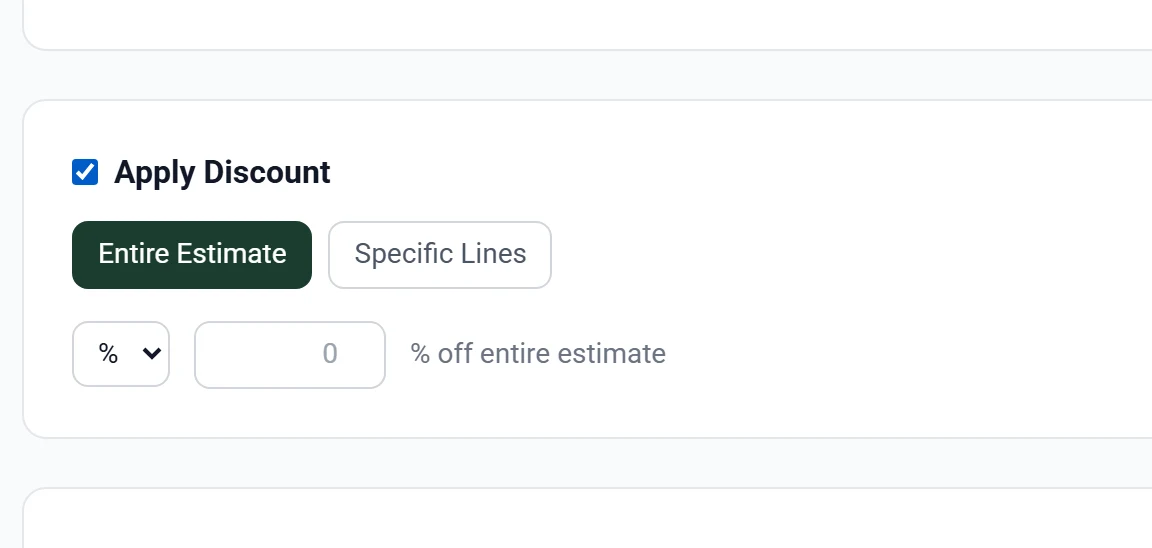
The controls do not exist until the box is ticked, which catches people out. If you cannot find where to type the amount, tick Apply Discount first.
Choose which kind
Two buttons appear: Entire Estimate and Specific Lines.
Entire Estimate
Takes the discount off the subtotal of everything. Pick % or $ from the small dropdown, then type the amount.
- 10 with % selected takes 10% off the whole estimate.
- 150 with $ selected takes $150 off the whole estimate.
Use this for a discount that is about the customer rather than the work: a repeat client, a neighbour signing up at the same time, a seasonal promotion.
Specific Lines
Discounts only the lines you choose, each with its own amount. Everything else stays at full price.
Use this when the discount is about one piece of work. If you are already on site with the chipper running, the second tree is cheaper for you to do, so discount that line and leave the first one alone. The customer can see exactly where the saving came from, which makes the number feel earned rather than arbitrary.
Check the total
The Summary panel shows the subtotal, the discount as its own line, then tax and the final total. Look at it before you send. A percentage and a dollar amount are easy to mix up, and 10% of a large removal is a very different number from $10.
Tax is calculated after the discount. That is normally what you want, but it does mean the final total moves by more than the discount amount alone. The Summary panel shows the real number, so trust that rather than doing it in your head.
Common questions
Can I use both kinds at once?
No. An estimate is either discounted as a whole or by line. If you need a bit of both, work out the total reduction you want and apply it whichever way tells the clearer story to the customer.
Does the customer see the discount?
Yes, as its own line in the totals. A discount they cannot see does not do the job a discount is for.
Can I discount an optional line?
Yes. Use Specific Lines and pick it. If the customer removes that optional line, its discount comes off with it.
How do I remove a discount?
Untick Apply Discount. The amounts are cleared and the total goes back to full price.
Should I discount or should I just quote less?
Quoting less hides the value of the work. A visible discount shows the customer your normal price and what they are getting off it, which is worth more to you when they compare quotes, and protects your rate on the next job, because your list price has not moved.